Products
Articles
Midi in Cell Phone

Show more testimonials...
I was lucky enough to have some MIDI files and a stock player on my laptop pc that would recognize and play them. All was well, and then I bought a new cell phone (LG Chocolate -V8550) which had the ability to play music - MP3 yes, MIDI no! So, here I was with a new toy, unable to play the music I wanted to hear and no clue on how to make it happen. It was time to bring on the power of the internet.
A quick list of requirements: First, it had to be either free or have a free trial. Second, it had to be easy to use for a novice (like me). And third, it had to be a full working version... no limits on number of files converted, or unreasonable limits on their size. Luckily the search didn't take long to come up with a good candidate - your MIDI to MP3 trial I fully subscribe to Murphy's Law and have always been wary of "free" trials.
I did a little more research, read the testimonials on your site, and was surprised to find a full working trial version - with only a time limit on how long the software would function. Ok, I was hooked and decided to give it a whirl. It was now after one in the morning on Tuesday and I would be getting up in less than 5 hours for work. I downloaded Direct MIDI to MP3 Converter and it became an obsession to see if it really worked. The install was clean and straight forward. Since my eyes were now fighting to stay open, the real test was at hand - could I really convert a midi file to mp3, download it into my cell phone, and finally have it play? And I had to accomplish this before I fell asleep (yes, I was obsessed!).
And of course being the type of person that would rather try to get something to work first and read directions only as a last resort, I was ready for the challenge. Of course the last thing I needed at this point was to have one of those Murphy moments - when you least expect it, something will go wrong. I launched your Direct MIDI to MP3 Converter, selected one of my MIDI files and took all the defaults for conversion. Believe it or not all went off without a hitch. Your software worked as advertised and created an MP3 file and saved it to the SD card for my cell phone. From there, the phone recognized the MP3 file I had just created and had no problems bringing it to life! I am now happily looking forward to converting more of my MIDI collection to MP3 files. I think I'm ready to read the documentation on your product and seeing what else I can do with it. Thanks for the free trial.
Gene
DOWNLOAD FREE TRIAL!
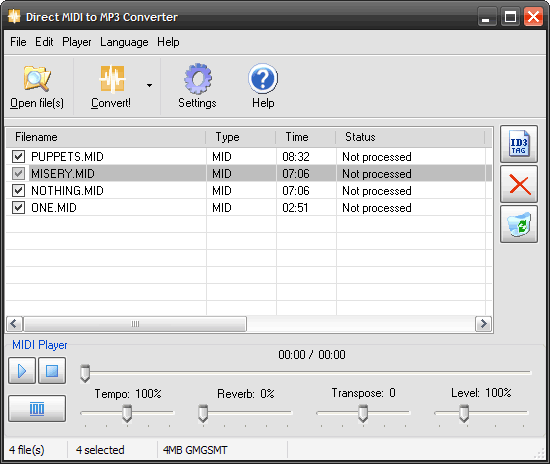
Direct MIDI to WAV/MP3 Converter's main features:
- Quick and fast midi rendering engine - up to 10 times faster than the original midi file time;
- Audio CD quality because of internal fast conversion without recording;
- SF2 Soundfont support;
- Adjustable reverb control;
- Adjustable Midi tempo;
- Fast batch conversion mode that saves your time;
- Most popular MIDI formats are supported;
- Adjustable qualities and bitrates;
- High quality built-in MIDI player with trackbar;
- Fully featured OGG/WMA/MP3 Tag editor;
- Full support of ID3 MP3 tags;
- Full support of WMA tags;
- Full support of OGG tags;
- Multilingual interface;
- Hot keys for all operations;
- An easy-to-use Drag and Drop interface;
- Recording Level adjustment;
- Ability to Minimize program during midi conversion;
- Transpose MIDI feature, you can change key;
- All available directions:
MIDI to MP3, MIDI to WAV, MIDI to WMA, MIDI to OGG, MIDI to WAVE,
MID to MP3, MID to WAV, MID to WMA, MID to OGG, MID to WAVE,
RMI to MP3, RMI to WAV, RMI to WMA, RMI to OGG, RMI to WAVE,
KAR to MP3, KAR to WAV, KAR to WMA, KAR to OGG, KAR to WAVE; - Windows Vista compatible.
We hope you enjoy all the features we've made in fast Direct MIDI to MP3 Converter.
If you want to split MP3 or WAV files into parts, use Direct WAV MP3 Splitter.
If you want to join multiple MP3 files, use Direct MP3 Joiner.
To convert audio files between various audio formats and rip CD audio tracks directly to MP3, WMA, WAV, OGG, FLAC, Monkey's Audio APE or MusePack MPC, use Direct Audio Converter and CD Ripper.
If you want to quickly convert MIDI to MP3, please use Direct MIDI to MP3 Converter.
MP3 Audio Recorder - Record high-quality music or low-bitrate audio streams directly into compressed sound files.
Pistonsoft MP3 Tags Editor is a powerful audio tagger to edit MP3, OGG, ASF and WMA tags of audio files. MP3 Tag Editor also allows you to create playlists, rename files, organize folders, export data to different formats, and more.
Freeware BPM Detector - Count Song's Beats per Minute Automatically.
Text to Speech Converter - Convert any text, document or Web page into an audio book or voice.