Products
Articles
MIDI Music in Powerpoint Presentations

Show more testimonials...
I do some arranging and composing of music on Finale. The music I arrange or compose is for my elementary students. The music is fairly simplistic. Most often, I take exercises from their book and put them together to make one piece on Finale. I often have the students listen to their music for concerts because it helps them to understand their parts as individual sections and as a whole. Finale only works with MIDI files, so when I want to make a CD, I have to convert it to a wav or mp3 file. Your program made it easy to do. The easiest that I have seen so far. I am very impressed.
I am not a music composer, though. I am a music teacher. So I also make powerpoint presentations. I search for music online, and often run into music that is in the midi format. Midi files work in powerpoint, but they do not work if you want to loop the song. So I have to convert the midi file to a .wav or .mp3 file in order to have the song looped. This program allowed me to convert the midi files so I could have a loopable song to across many slides.
I love this program a lot because it allows me to convert midi to multiple files, not just one. This way I can make CD's that work in regular CD players, and I can make .mp3's for my powerpoint presentations or even to make a backup CD of all of my songs that I have arranged or composed for my students. Without this program, I had to play the midi file on Finale and record it at the same time to another program such as cool edit or sound forge. This was a long, drawn out process and often had to be watched to make sure the song did not distort in the recording process or be too soft, but now with your program, I zip through that process and have more time to do other things. The conversion makes the music level, so there is no distortion nor really quiet spots. I just want it to be known to everyone what a wonderful product you have and how easy it is to use. I hope that others will find it as usefull and easy to use as I have.
Thank you Piston Software for making such a great and reliable product.
Chadha, www.csdnb.org
DOWNLOAD FREE TRIAL!
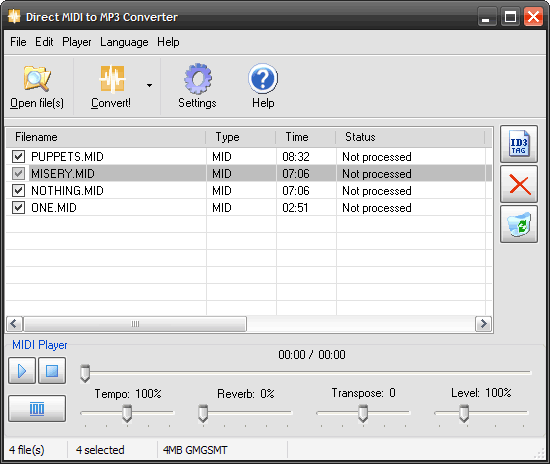
Direct MIDI to WAV/MP3 Converter's main features:
- Quick and fast midi rendering engine - up to 10 times faster than the original midi file time;
- Audio CD quality because of internal fast conversion without recording;
- SF2 Soundfont support;
- Adjustable reverb control;
- Adjustable Midi tempo;
- Fast batch conversion mode that saves your time;
- Most popular MIDI formats are supported;
- Adjustable qualities and bitrates;
- High quality built-in MIDI player with trackbar;
- Fully featured OGG/WMA/MP3 Tag editor;
- Full support of ID3 MP3 tags;
- Full support of WMA tags;
- Full support of OGG tags;
- Multilingual interface;
- Hot keys for all operations;
- An easy-to-use Drag and Drop interface;
- Recording Level adjustment;
- Ability to Minimize program during midi conversion;
- Transpose MIDI feature, you can change key;
- All available directions:
MIDI to MP3, MIDI to WAV, MIDI to WMA, MIDI to OGG, MIDI to WAVE,
MID to MP3, MID to WAV, MID to WMA, MID to OGG, MID to WAVE,
RMI to MP3, RMI to WAV, RMI to WMA, RMI to OGG, RMI to WAVE,
KAR to MP3, KAR to WAV, KAR to WMA, KAR to OGG, KAR to WAVE; - Windows Vista compatible.
We hope you enjoy all the features we've made in fast Direct MIDI to MP3 Converter.
If you want to split MP3 or WAV files into parts, use Direct WAV MP3 Splitter.
If you want to join multiple MP3 files, use Direct MP3 Joiner.
To convert audio files between various audio formats and rip CD audio tracks directly to MP3, WMA, WAV, OGG, FLAC, Monkey's Audio APE or MusePack MPC, use Direct Audio Converter and CD Ripper.
If you want to quickly convert MIDI to MP3, please use Direct MIDI to MP3 Converter.
MP3 Audio Recorder - Record high-quality music or low-bitrate audio streams directly into compressed sound files.
Pistonsoft MP3 Tags Editor is a powerful audio tagger to edit MP3, OGG, ASF and WMA tags of audio files. MP3 Tag Editor also allows you to create playlists, rename files, organize folders, export data to different formats, and more.
Freeware BPM Detector - Count Song's Beats per Minute Automatically.
Text to Speech Converter - Convert any text, document or Web page into an audio book or voice.