Products
Articles
Midi Piano Teacher

Show more testimonials...
One of the best ways to develop rhythm is to play along with someone (or something) - preferably an experience musician, but a recording will do. I use audio clips for the students to play along with, or to hear how it's "supposed" to be played. Until a few years ago using MIDI was fine and I could put files on disk for students or email them. With MP3 becoming more commonplace, some computers do not have the capacity to handle a MIDI file. In addition, converting to MP3 allows my students to play these sample/accompaniment files through their Ipods or whatever device they want, whereas MIDI is mostly obsolete and can only be played (maybe?) through the PC. Still, it is convenient to create songs in Finale and then convert them to MIDI since I can change the tempo, key or instrumentation without redoing the whole song. This is especially true since I have the music notated already as part of my books of arrangements that I make available to my students.
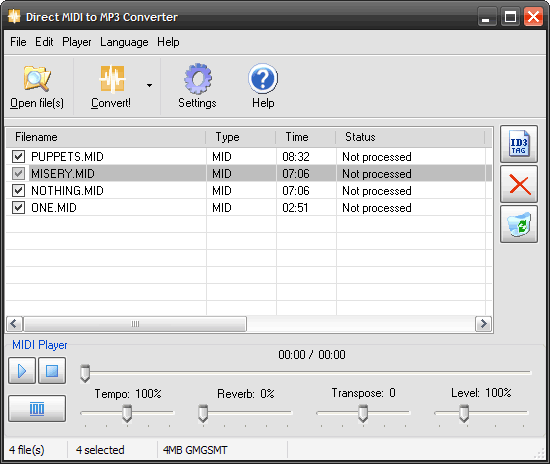
The Direct MIDI to MP3 Converter software is easy to use, and the MP3 files it outputs sound quite good. In fact, the MP3s seem to sound BETTER than the original MIDI files. The feature "save to same directory as original" is very convenient. Also very useful and convenient is the converter's ability to transpose (change key) from the original MIDI file, and to change the tempo. These are exactly the kinds of modifications I make all the time to suit individual students. I am very thankful that the program does this. You can also bump up the volume, which I like because Finale's MIDI file output tends to come out with far too low or a recording level.
Another interesting use for the converter is taking MIDI files acquired off the internet, particularly classical selections, and converting them so they can be shared more easily, or even played on external devices. I am pleased to have found this product. The controls are easy to use, and I intend to upgrade to the full registered copy soon.
Alex Citron (Syracuse, NY)
DOWNLOAD FREE TRIAL!
Direct MIDI to WAV/MP3 Converter's main features:
- Quick and fast midi rendering engine - up to 10 times faster than the original midi file time;
- Audio CD quality because of internal fast conversion without recording;
- SF2 Soundfont support;
- Adjustable reverb control;
- Adjustable Midi tempo;
- Fast batch conversion mode that saves your time;
- Most popular MIDI formats are supported;
- Adjustable qualities and bitrates;
- High quality built-in MIDI player with trackbar;
- Fully featured OGG/WMA/MP3 Tag editor;
- Full support of ID3 MP3 tags;
- Full support of WMA tags;
- Full support of OGG tags;
- Multilingual interface;
- Hot keys for all operations;
- An easy-to-use Drag and Drop interface;
- Recording Level adjustment;
- Ability to Minimize program during midi conversion;
- Transpose MIDI feature, you can change key;
- All available directions:
MIDI to MP3, MIDI to WAV, MIDI to WMA, MIDI to OGG, MIDI to WAVE,
MID to MP3, MID to WAV, MID to WMA, MID to OGG, MID to WAVE,
RMI to MP3, RMI to WAV, RMI to WMA, RMI to OGG, RMI to WAVE,
KAR to MP3, KAR to WAV, KAR to WMA, KAR to OGG, KAR to WAVE; - Windows Vista compatible.
We hope you enjoy all the features we've made in fast Direct MIDI to MP3 Converter.
If you want to split MP3 or WAV files into parts, use Direct WAV MP3 Splitter.
If you want to join multiple MP3 files, use Direct MP3 Joiner.
To convert audio files between various audio formats and rip CD audio tracks directly to MP3, WMA, WAV, OGG, FLAC, Monkey's Audio APE or MusePack MPC, use Direct Audio Converter and CD Ripper.
If you want to quickly convert MIDI to MP3, please use Direct MIDI to MP3 Converter.
MP3 Audio Recorder - Record high-quality music or low-bitrate audio streams directly into compressed sound files.
Pistonsoft MP3 Tags Editor is a powerful audio tagger to edit MP3, OGG, ASF and WMA tags of audio files. MP3 Tag Editor also allows you to create playlists, rename files, organize folders, export data to different formats, and more.
Freeware BPM Detector - Count Song's Beats per Minute Automatically.
Text to Speech Converter - Convert any text, document or Web page into an audio book or voice.