Products
How to Record Audio
Record MP3 Files Directly from any Sound Sources
Create audio presentations or narrations, make Web podcasts, record Web radio stations or class lectures or tape voice memos easily and conveniently. Record audio from microphone, CD/DVD player, games, radio, TV etc. There are many unique requirements to the format, quality and size of audio files for different purposes.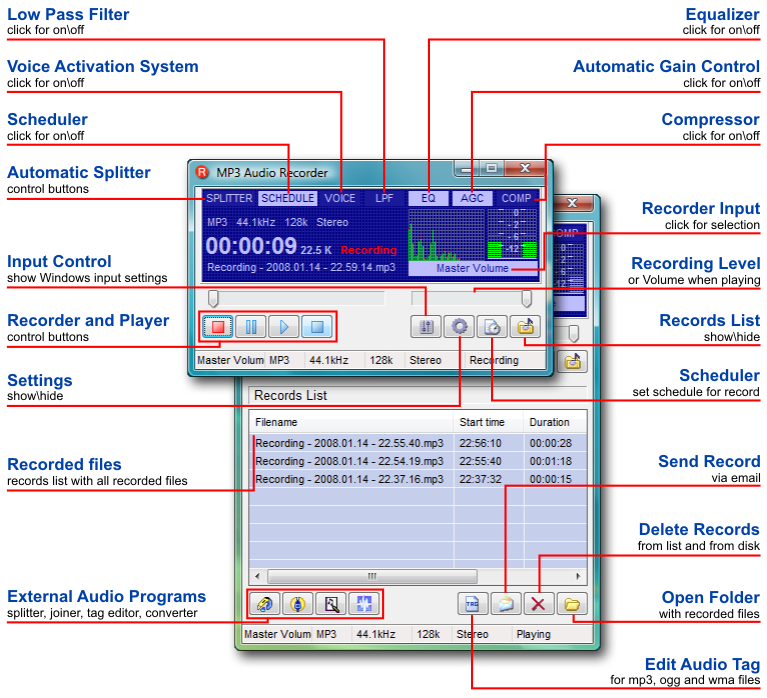
Global hot keys allow keyboard recording control:
- Ctrl+Alt+R = Record;
- Ctrl+Alt+P = Play;
- Ctrl+Alt+S = Stop;
- Ctrl+Alt+U = Pause.
Pistonsoft MP3 Audio Recorder records audio and saves it directly into any format without additional compression or conversion. All bitrates of MP3, WMA, WAV and OGG formats are natively supported. See all MP3 Recorder features.
If you want to split MP3 or WAV files into parts, use Direct WAV MP3 Splitter.
If you want to join multiple MP3 files, use Direct MP3 Joiner.
To convert audio files between various audio formats and rip CD audio tracks directly to MP3, WMA, WAV, OGG, FLAC, Monkey's Audio APE or MusePack MPC, use Direct Audio Converter and CD Ripper.
If you want to quickly convert MIDI to MP3, please use Direct MIDI to MP3 Converter.
MP3 Audio Recorder - Record high-quality music or low-bitrate audio streams directly into compressed sound files.
Pistonsoft MP3 Tags Editor is a powerful audio tagger to edit MP3, OGG, ASF and WMA tags of audio files. MP3 Tag Editor also allows you to create playlists, rename files, organize folders, export data to different formats, and more.
Freeware BPM Detector - Count Song's Beats per Minute Automatically.
Text to Speech Converter - Convert any text, document or Web page into an audio book or voice.
Articles
News

Black Friday discount 42% off for all our products. Please use GloryToUkraine2014 coupon code and go shopping!

We launched a two weeks-long Christmas sale -50% for all our products. Please use MCH2013 coupon code. Merry Christmas and Happy New Year!

We launched a Halloween sale for all our products. Please use halloween2013 coupon code for 50% discount!